
Enterprise Foundations
The Enterprise Stack is build up of a set of resources, like Organizations, Tenants/Sub-Tenants, Services (e.g. Issuer, Verifier, KMS), and the data of the individual services (e.g. Issuance Requests, Private/Public Keys, Configurations). Together the resources form a tree like structure as shown below.
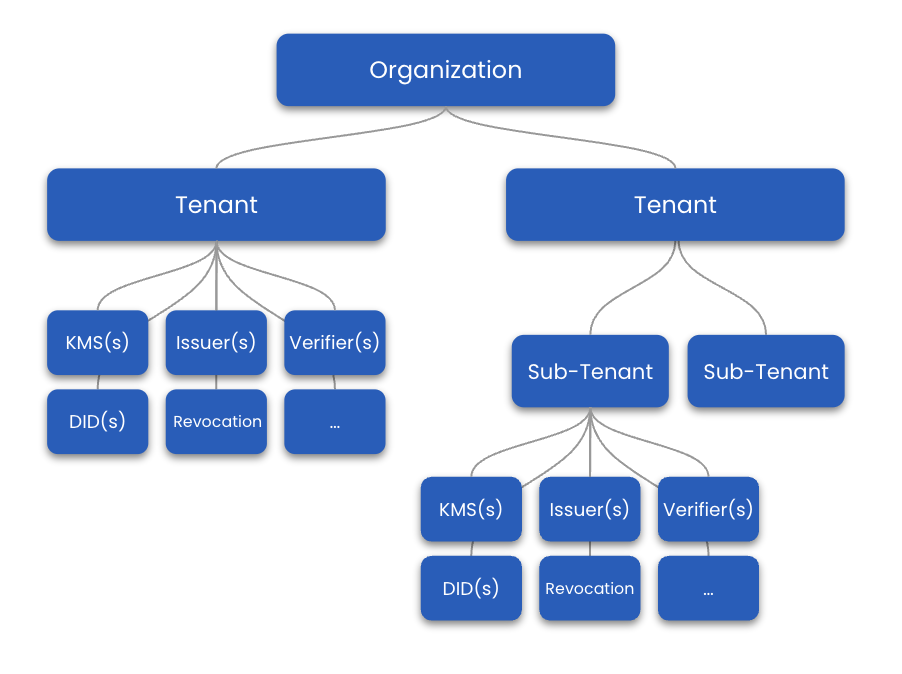
The Organization
The Organization is your account. Under the Organization you can group customers as tenants, sub-tenants, or create a tenant of your own. This way services and their data can be kept virtually separate, enabling you to easily manage different customers or services of your own under one roof. Also, this structure allows you to build and sell B2B2C products (e.g., you can resell to business clients who offer consumer products).
While the Enterprise Stack allows for multiple Organizations, on-prem Enterprise deployments should always have one Organization.
An organization identifier might be waltid
Tenants
Tenants enable you and your customers to launch enterprise services like issuer, verifier, KMS, Credential Web Registry, and more. You can also create sub-tenants inside of tenants and sub-tenants. At this point, there is no limit to the level of nested sub-tenants. Services and their data inside tenants and sub-tenants are kept separate.
A tenant identifier might be waltid.tenant1
Services
Services provide the functional capabilities for decentralized identity and ID wallets. They can be created inside of tenants and sub-tenants.
Each service has its own configuration. Therefore, you can have services of the same type for different purposes. For example, you could have an issuer for issuing only W3C credentials and another for only SD-JWT VCs.
Think of these services as Lego blocks: each one has a focused responsibility, and you can compose them to match the credential lifecycle you need—issuance, storage, verification, and everything in between.
Service types
In the Enterprise Stack there are two broad categories of services. You often run both side by side to balance “do the work” versus “persist the state.”
Operational services (do things)
These are the engines that execute credential and identity flows.
- Issuer – Sign and issue credentials via OID4VC.
- Verifier – Verify credentials using the draft OpenID4VP specifications.
- Wallet Service – Custodial wallet for storing and managing credentials and keys.
- KMS – Manage keys for wallet & credential signing.
- DID Service – Create DIDs based on various methods (did:key, did:web, ...).
Storage & registry services (store and expose data)
These persist the data that operational services depend on and expose it via APIs.
- Credential Store Service – Store and query credentials.
- DID Store – Store and query DID documents.
By mixing operational and storage services you can scale different parts of your solution independently while keeping responsibilities cleanly separated.
Note: The above lists highlight the main services in each category but is not fully exhaustive. For a complete overview of all available services and their features, please visit the Service Catalog.
Service dependencies
Services might also depend on other services to provide their functionality. For example, an issuer needs keys for signing credentials and would, therefore, require a KMS service under the same tenant or sub-tenant.
A service identifier might be waltid.tenant1.issuer1
Service Data
Each service can hold different types of data. An issuer, for example, might hold issuer configurations like the credentials the issuer can offer or a list of open credential offers and their related sessions.
Accounts, API Keys and the Super Admin
To access the Enterprise Stack, you either need an Account (used mainly for UI access), an API Key (used for machine access), or a Super Admin. Accounts and API Keys can hold different roles. Roles are simply a set of grouped permissions (e.g., create key, delete service). Therefore, when your Account or API Key has assigned the role with the required permissions to perform the necessary actions, you can operate and use the Enterprise Stack via the Admin Interfaces or the Enterprise APIs. The Super Admin can do everything and doesn’t require any roles.
If you want to learn more checkout the Accounts, API-Keys and Super Admin section under administration.